
ITSM in digital transformation is the layer that decides whether new technology actually reaches the people who have to use it every day. Every other part of a programme can go well and still produce nothing. The service desk is where the gap shows up first.
For an IT Head at a 400-person manufacturing or aviation company, the current picture is familiar. Requests arrive by email, WhatsApp and a shared inbox. Tickets get assigned manually every morning, SLA breaches are discovered after the customer complains, and asset records live in a spreadsheet that one person updates.
A study by BCG found that 70% of digital transformations fall short of their objectives, with the people and process dimension deciding the outcome more often than the technology. This guide covers what to evaluate in an ITSM platform, where mid-market evaluations go wrong, and how the main options compare. If you want the product view first, the DGlide ITSM module is here.
TL; DR
Judge an ITSM platform by how long a workflow change takes, not by the length of its feature list.
Score every shortlisted tool on who can edit a workflow: a business user, an internal developer, or a paid consultant.
Run your two ugliest real requests through each demo instead of the vendor's clean sample ticket.
Expect ITSM to serve facilities, HR and field teams within 18 months, and check the per-department cost before you sign.
Treat ServiceNow as the right answer only when you have multi-region CMDB depth and 5,000+ users.
Fix ticket intake and SLA visibility before buying an AI add-on, because AI on bad routing data just fails faster.
What role does ITSM in digital transformation actually play?
ITSM in digital transformation provides the operating layer that keeps new services running after launch: request intake, incident and problem management, change control, SLA tracking and asset records. Without it, a new ERP or field application generates support demand that nobody has a route for. The technology goes live, and the service around it does not exist.
The AI Overview for this topic frames ITSM as structure, governance and automated workflows. That is accurate but incomplete for an operations-heavy company. Three things carry the real weight.
Stability during a period of constant change
Change management is what stops a rollout from breaking production every second week. It records what changed, who approved it, and what it touched. For a manufacturing plant running MES and SAP alongside a new maintenance app, that record is the difference between a 40-minute fix and a three-day investigation.
Access for people who are not in IT
A service catalog turns “who do I email about this” into a request form with an owner and a timer. Airport ground staff, plant supervisors and facilities teams are the heaviest users of this, not the IT department. Most ITSM tools are configured for IT and then quietly fail every other department.
Automation that removes the morning triage ritual
Automatic routing by skill, location and priority removes the two hours an IT Head loses every Monday assigning last week's backlog. Incident and problem management then separate the daily firefighting from the recurring root cause. Both are basic, and both are still done by hand in most mid-market companies.
These three functions are what an evaluation should test. Feature checklists rarely do.
Why does the ITSM platform meant to govern change become the thing that resists it?
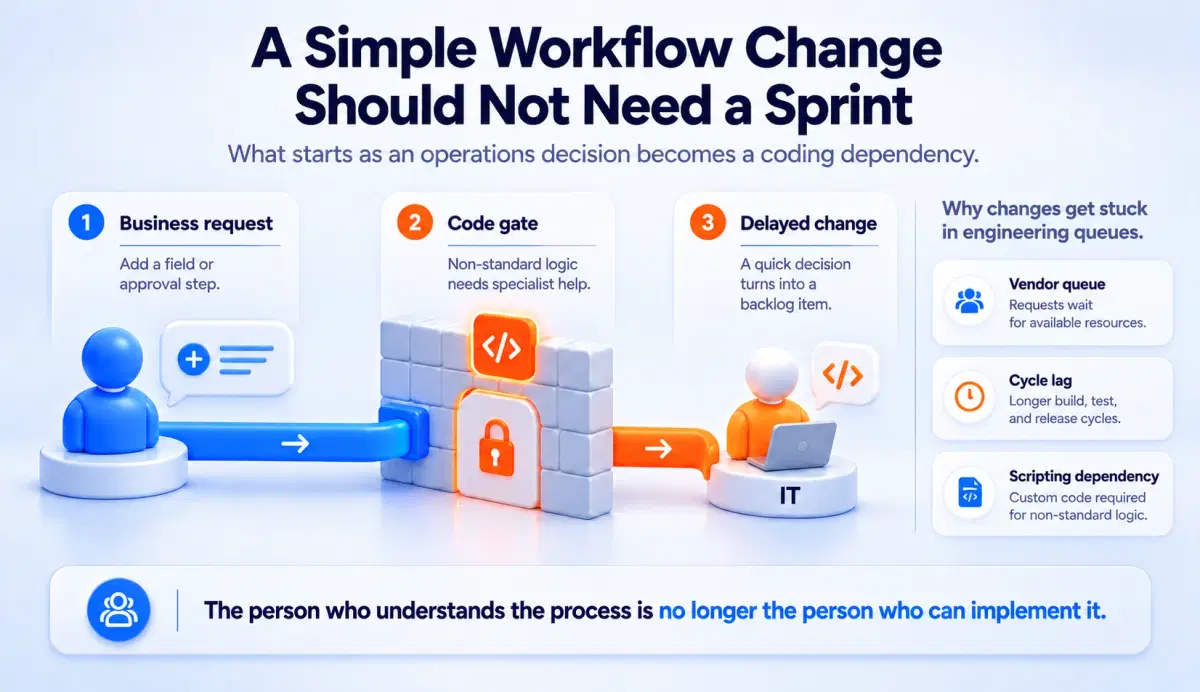
The ITSM platform bought to govern a digital transformation usually becomes the slowest-changing system in the company. This happens because the tool that holds every workflow is also the tool nobody in-house is allowed to edit. Governance stops being a control and starts being a queue.
1. Every workflow edit becomes a vendor ticket.
An IT Head who wants to add an approval step to the asset request form raises a request with the implementation partner. Two weeks and a change fee later, the field is live. Which is how a company ends up filing a change request in order to change the change request form.
2. The business moves faster than the configuration cycle.
Manufacturing adds a second plant, aviation adds a terminal, facilities takes on a new site. The org chart changes in a week, the routing rules change in a quarter. Tickets land in the wrong queue for the entire gap.
3. Scripting requirements push work back to IT.
ManageEngine ServiceDesk Plus handles standard IT flows well, then asks for scripting the moment a workflow leaves the default path. That converts a 20-minute business decision into a developer sprint item. The operations manager who understood the process best is no longer the person who can implement it.
The criterion that predicts whether ITSM in digital transformation succeeds is change latency: the elapsed time between deciding a workflow should change and that change being live. Under a day is healthy. Over a month means the platform is now governing you.
If your service desk backlog is triaged by hand every Monday morning because nobody can safely edit the routing rules, that is worth one 15-minute conversation.
Which criteria should an IT Head use to evaluate ITSM tools?
The evaluation criteria that separate ITSM platforms for a digital transformation programme are configuration ownership, deployment duration, non-IT department fit, pricing behaviour at scale, and exit cost. Feature parity across the mid-market category is now high. Almost every vendor has incident management, a service catalog, SLA timers and a knowledge base.
Score each shortlisted tool against the five questions below before the demo, not after.
Who can change a workflow without raising a ticket?
Ask the vendor to edit a form field live in the demo. If a solution engineer opens a script editor, your operations team will not be doing this. If they drag a field into place, they will.
How long until the first department is live?
ServiceNow deployments for mid-market companies typically run 6 to 12 months with consulting attached. Ask for a named reference at your size and headcount. Deployment duration is the single largest hidden cost in ITSM in digital transformation programmes.
What happens when facilities and HR ask for the same platform?
Most ITSM tools price and configure for IT, then charge per additional department or per agent. Ask what a facilities request workflow costs to add. The answer tells you the 24-month bill, not the year-one quote.
Does the price move when you turn on AI and automation?
Freshservice users consistently report that automation, AI and orchestration features sit in higher tiers or as add-ons. Get the quote with every feature you saw in the demo actually switched on.
What does leaving look like?
Ask where your ticket history, asset records and workflow definitions go if you exit. API access to your own data should not be a paid tier. Vendor lock-in in service management is usually discovered at renewal.
Bring these five questions to every vendor call. They are harder to answer than a feature matrix and far more predictive.
Where do mid-market ITSM evaluations go wrong?
Mid-market ITSM evaluations go wrong when the buying team scores the demo instead of scoring their own worst workflow. Vendors demo a clean incident: one requester, one agent, one resolution. Real operations are messier, and the mess is where platforms separate.
The airport scenario. Airport ground handling operates on baggage transfer SLA windows of roughly 15 minutes. In deployments we have run for an airport operations team, the failure mode was never ticket volume. It was that a request logged by email closed its own SLA window before anyone read it.
Result: ticketing, lost and found, and asset monitoring were built as separate flows and operated by non-technical airport staff. The build took weeks, and the operations team edited the forms themselves afterwards.
The manufacturing scenario. A plant IT team ran an internal service desk on email while the field maintenance crew coordinated on WhatsApp. Neither system produced an audit trail, so recurring faults were never identified as recurring.
Result: field coordination and the IT service desk were deployed on one platform without a consultant. Problem management became possible because the same asset finally appeared in both records.
Both cases share a pattern. The failure was in intake and visibility, not in the sophistication of the ITSM framework. Ask the vendor to configure your ugliest real request during the evaluation, and see the DGlide case studies for how those builds were structured.
Still running lost and found on a spreadsheet that only one person updates? See what a configured ticket flow looks like in 10 minutes.
How do ServiceNow, Freshservice, ManageEngine and DGlide compare?
For a mid-market operations-heavy company, the four platforms most often shortlisted differ less on features and more on who can change them and what that costs. The table below compares the dimensions that decide ITSM in digital transformation outcomes rather than the ones vendors lead with.
Evaluation dimension | ServiceNow | Freshservice | ManageEngine | DGlide |
Typical time to first department live | 6 to 12 months | 4 to 10 weeks | 4 to 12 weeks | Days to weeks |
Who edits a workflow | Certified developer or partner | Admin, within tier limits | Admin, scripting for non-standard flows | Business user, drag and drop |
AI and automation pricing | Enterprise tiers | Higher tiers and add-ons | Varies by module | Included |
Non-IT departments | Strong, at enterprise cost | Supported, priced per department | Supported, module-dependent | Same platform, no separate module |
Best fit | 5,000+ users, multi-region CMDB | IT-first teams wanting fast setup | Existing ManageEngine estates | 200 to 800 person operations-heavy companies |
Consulting requirement | High | Low to moderate | Moderate | None |
An honest note on fit. If your organisation runs 5,000+ IT users across multiple global regions with deep CMDB and multi-instance requirements, ServiceNow's enterprise depth is genuinely the better choice, and DGlide is not the right platform for you. The comparison changes entirely between 200 and 800 people, which is where DGlide is built to operate.
A direct feature-level view against one of these is available in the DGlide and Freshdesk comparison.
What has changed for ITSM buyers in 2026?
In 2026, the budget context around ITSM in digital transformation has shifted, because service management is now competing with AI infrastructure for the same money. Gartner raised its forecast in July 2026, projecting worldwide IT spending of $6.37 trillion, up 14.2%, driven by data centre systems and AI infrastructure. Growth in the total does not mean growth in your line item.
The problem this creates. An IT Head is now asked to modernise the service desk while the discretionary budget moves toward AI and data platforms. Six-figure consulting engagements for an ITSM rollout are harder to defend than they were two years ago. The approval question has changed from “is this the best platform” to “why does this need a consultant at all”.
What buyers are doing instead. Shortlists have shifted toward platforms an internal operations team can configure and keep configuring. Cost is measured across three years including change requests, not as a year-one licence. DGlide customers see roughly 40% IT cost savings against legacy vendors, and most of that gap is consulting and change fees rather than licence price.
There is a second reason this matters. Uptime Institute reported that 57% of respondents said their most recent major outage cost more than $100,000, with one in five above $1 million. Incident and problem management stop being administrative overhead at those numbers. Details of how the underlying engine is built are on the DGlide platform page.
Why Should You Choose DGlide?
If you are running ITSM in a digital transformation programme at a 200 to 800 person aviation, manufacturing, logistics or facility management company, the constraint is almost never the framework. It is that your ManageEngine instance needs a script, your Freshservice quote grows with every feature, and your field teams are still coordinating on WhatsApp. DGlide is built for that specific position.
Incident, problem and change management configured by your operations lead, not by a certified partner
Service catalog and request forms built in a drag-and-drop form builder, so a new department goes live the same week it asks
SLA timers with multi-department routing, which is what closes a 15-minute airport baggage window
Asset and CMDB records linked to the same tickets your field team raises from mobile
Built-in AI, automation and integrations to Salesforce, Slack, Google Workspace and REST APIs, included rather than tiered
Deployments run in days to weeks rather than months, and no IT specialist is required to keep the system current. Companies moving from legacy vendors see around 40% IT cost savings, mostly on the change and consulting line.
vs ManageEngine: DGlide reconfigures workflows in drag-and-drop. ManageEngine requires scripting.
vs Freshservice: DGlide includes AI and automation. Freshservice prices them separately.
vs ServiceNow: DGlide deploys 6 to 12x faster, without USD 100K to 500K in consulting.
vs WhatsApp and Excel: DGlide gives every stakeholder a timestamped, searchable, auditable record.
The practical test is simple: bring the workflow your current tool cannot handle, and see it configured live. Book a free 15-minute demo.
Conclusion
The platform you choose for ITSM in digital transformation determines how quickly your organisation can change its own processes for the next five years. Feature matrices converge across the mid-market category, so they are a weak basis for the decision. Change latency, configuration ownership and three-year cost separate the options that hold up from the ones that harden.
For an IT Head or VP Operations, acting on this means one change to the evaluation process. Score every shortlisted vendor on who edits a workflow and how long that takes, then bring your messiest real request to each demo. The platform that handles it without a consultant on the call is the one that will still fit your operation after the next reorganisation. Current pricing across modules is on the DGlide pricing page.
FAQs
What is the role of ITSM in digital transformation?
ITSM in digital transformation keeps new services usable after they launch. It handles request intake, incidents, change control, SLA tracking and asset records. Without it, new technology creates support demand with no route. The service layer, not the technology, decides adoption.
Why do digital transformation projects fail at the service desk?
They fail because request intake and routing are never redesigned alongside the new technology. Tickets arrive by email or WhatsApp with no owner or timer. Nobody sees SLA breaches until a customer reports them. The platform works, the service around it does not.
Which ITSM practices matter most during a digital transformation?
Change management, incident and problem management, service catalog and asset records matter most. Change management protects production during frequent releases. Incident and problem management separate daily firefighting from recurring root causes. The service catalog gives non-IT staff a route in.
How do you choose an ITSM tool for a digital transformation programme?
Score each tool on who can edit a workflow without a consultant. Ask for deployment duration with a reference at your headcount. Get pricing with AI and automation switched on. Then confirm what your data export looks like at exit.