

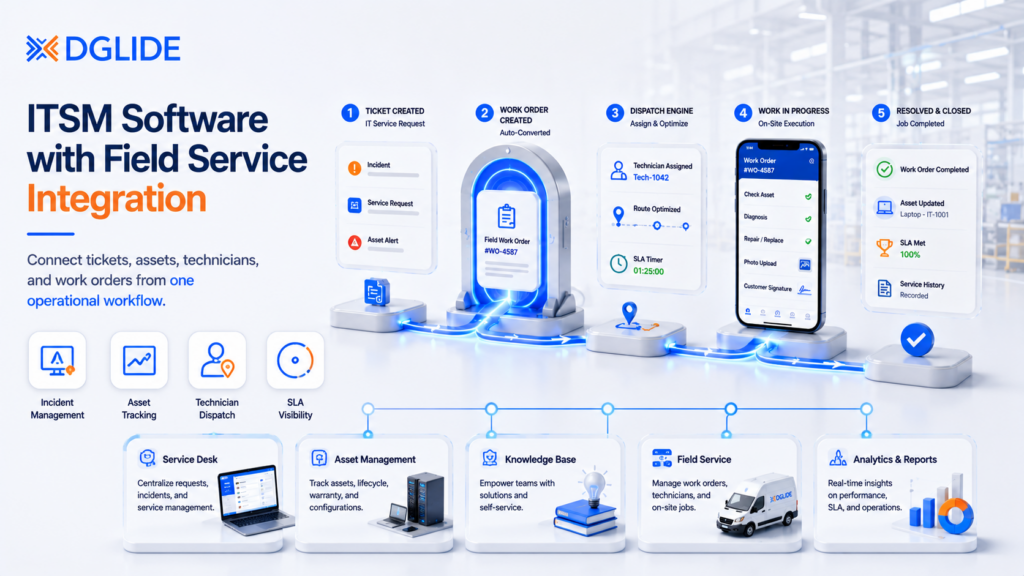
ITSM software with field service integration connects IT tickets to physical field work, so IT and operations teams can manage service requests, assets, technicians, and work orders from one system. The global field service management market is projected to reach USD 9.17 billion by 2030 from USD 5.10 billion in 2025 at a CAGR of 12.5%, according to MarketsandMarkets (November 2025). At the same time, the IT service management market is estimated at USD 14.95 billion in 2026, growing at a 16.45% CAGR through 2031, according to Mordor Intelligence (January 2026). This matters when support no longer ends at a desk.
A 300-employee company with a two-person IT team usually feels this first. Email and Slack still work for simple requests, but they fall apart when the business doubles, assets multiply, and field teams need action outside the office.
TL;DR
- ITSM with field service integration connects IT tickets to physical work orders.
- Small IT teams should add structure before email and Slack become a backlog.
- Enterprise ITSM and FSM platforms often exceed what mid-market teams can manage.
- Heavy customization feels useful early, then creates long-term admin problems.
- The right platform connects incidents, assets, work orders, dispatch, and SLAs.
- DGlide fits mid-market teams needing ITSM and field workflows with low admin load.
What Is ITSM Software with Field Service Integration?
ITSM software with field service integration connects IT tickets to physical field work. IT and operations teams can manage service requests, assets, technicians, and work orders from one system, so support does not stop at the helpdesk.
How IT Tickets Become Field Service Tasks
When a user raises a ticket for a faulty device or asset, the system records the issue, sets priority, and links it to the asset. If on-site work is needed, the ticket becomes a field task with location, issue notes, and closure steps for the technician.
The service desk sees the ticket, the field service management platform shows the work order, and managers see the asset, SLA, and job status in one connected flow.
Why This Matters for IT and Operations Teams
IT may own the ticket, but operations feels the delay. A connected system lets teams assign, fix, and update field issues without switching between tools or making follow-up calls.
When Does a Growing Team Actually Need ITSM and Field Service Together?
A growing team needs ITSM software with field service integration when support requests move beyond the helpdesk and need physical action across branches, devices, service locations, technicians, or assets.
- Support spreading across locations: Requests no longer stay inside one office or one IT inbox. Branches, service sites, devices, and field teams all need coordinated support.
- Email and Slack losing control: Chat tools can report a problem, but they do not assign ownership, track SLAs, link assets, or confirm field closure.
- A small IT team depending on memory: As the company grows, IT teams rely on chat threads, follow-ups, and manual tracking without a proper system.
- Structure needed before support becomes messy: Small IT teams should add incident, request, knowledge, and asset basics early. This makes adoption easier before employees build habits outside the system.
- Field work orders added only when needed: Teams can start with core IT service management workflows first, then add field work orders for tasks that need on-site technician action.
- A system simple enough for the current team: A growing company does not need the heaviest ITSM and FSM stack first. It needs a platform that fits current budget, maturity, support model, and business processes.
Why Enterprise ITSM and Field Service Platforms Become Overkill for Mid-Sized Teams
Enterprise ITSM software with field service integration becomes overkill when the platform needs more care than the service process itself. This happens when a mid-sized team buys for future scale before it has the people to manage that scale.
ServiceNow, Salesforce, BMC Helix, and Microsoft Dynamics can support large service operations. The problem is fit, not capability.
The Cost of Buying Too Early
A mid-sized company can buy a large platform and still struggle with daily work. The platform may have every module, but the team may not have the admin time, process owners, or data maturity to use it well.
This is where the real cost appears. It is not only the license. It is the time spent setting up forms, routing rules, asset records, reports, and mobile workflows.
“Conventional ITSM practices act as barriers to agility, speed and flow.” Siddharth Shetty and Chris Laske, Research Authors, Gartner Source: Gartner Hype Cycle for IT Service Management, 2024
⚠️ Pre-publish verify: Confirm this exact phrasing appears in the full Gartner document before publishing. The report is gated; client team should access via Gartner subscription and verify the sentence verbatim.
When Enterprise-Grade Makes Sense
Enterprise-grade platforms make sense when field service is complex and highly regulated. They also fit when the company has dedicated admins, deep integration needs, and large field teams.
For a lean IT team, that is not always the case. A platform can be excellent and still be wrong for the current stage.
📊 The global ITSM market is estimated at USD 14.95 billion in 2026, growing to USD 32.01 billion by 2031 at a CAGR of 16.45%: This growth is being driven by AI-driven automation, cloud-native migration, and low-code orchestration across hybrid environments.
Source: Mordor Intelligence, January 2026
The Customization Trap: Why Heavy Workflow Changes Break ITSM Tools Later
ITSM software with field service integration becomes hard to manage when every old process turns into a custom workflow. Customization should be used carefully, not added for every small preference.
- Customization starts small but grows quickly. Teams often begin with one custom field. Soon, they add custom roles, approval paths, routing rules, and work order flows.
- Too many custom workflows make the system hard to manage. After a few months, only one admin may understand how the setup works. If that person leaves, the system becomes difficult to update.
- Upgrades and changes become risky. Heavy customization can break during updates or migrations. Documentation also falls behind when teams keep changing workflows without tracking them.
- Out-of-box workflows should run first. Teams should use the default setup for two to three months. This helps them understand which gaps are real and which ones are unfamiliar processes.
- Field teams should not learn unnecessary steps. Technicians need simple mobile workflows. Adding too many custom steps too early makes field adoption harder.
- Customization should solve a real work problem. Good examples include routing branch hardware tickets to local technicians or adding approvals for high-value asset replacement.
- If it does not reduce work, do not add it. Every custom field or workflow should reduce effort for IT, operations, or field staff. If it only adds more steps, remove it.
🔧 Mid-market teams lose months customizing workflows before they’ve run the default setup long enough to know what they actually need. See how DGlide’s no-code workflow engine lets operations and IT teams adjust forms, routing, and approvals without a developer.
What Features Should ITSM Software with Field Service Integration Include?
ITSM software with field service integration should connect support intake, work orders, technician updates, assets, SLAs, and knowledge in one practical flow. A tool that only connects tickets and tasks still leaves gaps.
The platform should help office teams and field teams work from the same service record. That prevents repeated calls, missing context, and slow closure.
Incident and Service Request Management
Incident management handles broken or blocked services. Service requests handle routine needs, such as access, devices, onboarding, and replacements.
These requests should be easy to raise and easy to route. Long forms reduce adoption, especially for employees and field teams. A proper ticket management system separates incident intake from routine requests, improving routing speed and reducing queue mix-up.
Field Work Order Creation
A field work order should carry the ticket context into the physical job. The technician should see location, asset, issue notes, customer or branch contact, priority, and checklist.
This is where ITSM and FSM (Field Service Management) must meet. The support record should not die inside the helpdesk.
Technician Assignment and Mobile Updates
Technicians need mobile access to job details, closure notes, photos, parts, and signatures. Offline access can matter for factories, remote sites, secure areas, and branch locations.
Managers need live job status. Without it, the service desk keeps calling technicians for updates instead of helping users.
Asset and SLA Tracking
Asset records show what device, machine, or system is affected. SLA rules show how fast the issue needs attention.
Together, these details make field work more accountable. They also help IT Heads see recurring asset problems before they become bigger service issues.
Best ITSM Software with Field Service Integration by Use Case
The best ITSM software with field service integration depends on how complex your field work is and how much admin capacity your team has. A lean mid-market team should not evaluate tools the same way as a large enterprise with dedicated platform owners.
| Use Case | Best-Fit Tools | Best For | What to Check Before Choosing |
| Enterprise IT and field service | ServiceNow FSM, Salesforce Field Service, BMC Helix with Mobile Reach | Large enterprises needing ITSM, assets, dispatch, and field service in one connected setup | Platform ownership, admin capacity, integration effort, and long-term setup cost |
| Teams already using a larger platform | ServiceNow, Salesforce, BMC Helix | Companies already working inside these systems | Works best when the business already has trained admins and existing platform investment |
| Asset-heavy service operations | Microsoft Dynamics 365 Field Service, IFS, BMC Helix-based setups | Utilities, telecom, healthcare equipment, manufacturing, and large facilities | Mobile offline access, asset depth, route planning, and ownership of field workflows |
| Mid-market operations teams | Freshservice, ManageEngine ServiceDesk Plus, DGlide | Teams needing ITSM depth without building a large platform team | Setup effort, admin dependency, workflow flexibility, and field task handling |
| Teams where IT and field work overlap | DGlide | Manufacturing, facility management, logistics, FMCG, and aviation teams | Best when IT tickets, field service, assets, and operations workflows need no-code control |
This comparison helps buyers avoid overbuying. The right tool should match the team’s current service model, not force the team to maintain a platform built for a much larger organization.
⚙️ Operations-heavy teams in manufacturing and facility management often need IT-to-field handoff workflows that enterprise platforms can’t configure without months of work. Book a free DGlide demo to see how your ticket and work order flow maps in one system.
ITSM Software with Field Service Integration Compared
ITSM software with field service integration should be compared by fit, ITSM depth, field service depth, setup effort, and admin load. The best tool is not the one with the longest feature list.
It is the one your IT and field teams can use without creating another maintenance problem.
| Tool | Best-Fit Team | ITSM Strength | Field Service Strength | Setup Effort | Admin Dependency | Where It May Fall Short |
| BMC Helix + Mobile Reach | BMC Helix customers | Strong ITSM and asset base | Strong mobile field capability | Medium | Medium to high | Best if BMC Helix already exists |
| DGlide | Mid-market operations teams | ITSM, tickets, assets, workflows | FSM, dispatch, field updates | Low to medium | Low | Not built for huge global governance |
| Freshservice | Growing IT teams | Strong service desk | Lighter field service fit | Low to medium | Medium | Field work may need extra setup |
| IFS | Asset-heavy enterprises | Service operations depth | Strong field service depth | High | High | Heavy for lean teams |
| ManageEngine ServiceDesk Plus | IT-heavy SMBs | Strong helpdesk and assets | Limited native field depth | Medium | Medium | Field service may need other tools |
| Microsoft Dynamics 365 Field Service | Microsoft-led teams | Needs Microsoft stack fit | Strong scheduling and field work | Medium to high | Medium to high | Can be heavy outside Microsoft teams |
| Salesforce Field Service | Salesforce-led enterprises | Service Cloud connection | Strong field dispatch and mobile | Medium to high | High | Needs Salesforce admin maturity |
| ServiceNow FSM | Large enterprises | Deep ITSM platform | Strong enterprise FSM | High | High | Often too heavy for mid-market teams |
This table should be used as a shortlist filter. It should not replace a workflow audit.
📊 The global field service management market is projected to grow from USD 5.10 billion in 2025 to USD 9.17 billion by 2030 at a CAGR of 12.5%: Manufacturing holds the largest end-user segment, driven by preventive maintenance, IoT integration, and asset operations.
Source: MarketsandMarkets, November 2025
How to Choose the Right Platform Without Rebuilding the Same Mess
The safest way to choose ITSM software with field service integration is to work backwards from current support maturity. Start with the work your team performs today, not the feature list a vendor shows in a demo.
The Reddit advice was clear: understand budget, maturity, support structure, business processes, and whether you need broader enterprise service management.
The 60 to 90 Day Usage Test
For the first 60 to 90 days, keep workflows simple. Run incidents, service requests, asset records, and one field work order path.
Then review what actually breaks. Customize only the parts that slow users, technicians, or managers.
The Field Service Fit Checklist
Use this checklist before buying. Teams can also review DGlide’s pricing tiers alongside these questions to see where each fits their current maturity.
- Which IT tickets need physical work?
- Which assets need field visits?
- Who assigns technicians?
- What mobile data must technicians update?
- Which SLAs apply to field work?
- What reports does the IT Head need?
- Can business users update forms without developers?
This gives the buyer a practical decision map. It also keeps the platform from becoming larger than the support problem.
Why DGlide Fits Mid-Market Teams That Need ITSM and Field Service Together
DGlide connects IT tickets, field work orders, assets, and no-code workflows in one system. It is built for teams where a factory issue, branch fault, or facility repair touches IT, operations, and field staff at the same time.
Who Should Choose DGlide
- IT tickets regularly need technician dispatch or asset context
- Field workflows change often and no-code control matters
- Admin capacity is lean and developer dependency is a problem
- Operations span manufacturing, facility management, logistics, FMCG, or aviation
Who Should Not Choose DGlide
Global enterprises with thousands of technicians and deep governance needs are better served by ServiceNow, Salesforce, BMC Helix, or IFS. DGlide is strongest where mid-market teams need operating control, not a large platform program.
🏭 If your IT tickets, field jobs, and assets live in three different places, that is a handoff problem. Book a free 15-minute DGlide demo to map your tickets, work orders, and field workflows in one no-code system.
Conclusion
ITSM software with field service integration should reduce handoff gaps between helpdesk tickets and field work. It should not force a small IT team to manage a platform built for a much larger company.
The right choice depends on field complexity, asset needs, mobile usage, and admin capacity. Start simple, run the first workflows cleanly, then add automation only where real usage proves the need.
FAQs About ITSM Software with Field Service Integration
ITSM software with field service integration connects IT tickets to field work orders. It helps teams assign technicians, track assets, manage SLAs, and close on-site tasks. It is useful when IT support needs physical action.
A company should connect ITSM with field service when tickets need on-site action. This includes branch issues, device faults, facility assets, and field equipment. The connection helps teams track ownership from ticket to closure.
ServiceNow works best when the company has dedicated platform owners and strong admin capacity. Mid-sized teams with lean IT structures often find setup and maintenance effort exceeds their current scale. A lighter ITSM and field service platform is usually a better starting point.
DGlide is a good option for mid-market teams needing ITSM and field workflows together. It fits companies with lean IT teams and changing service processes. It is strongest where tickets, assets, and field tasks overlap.
