

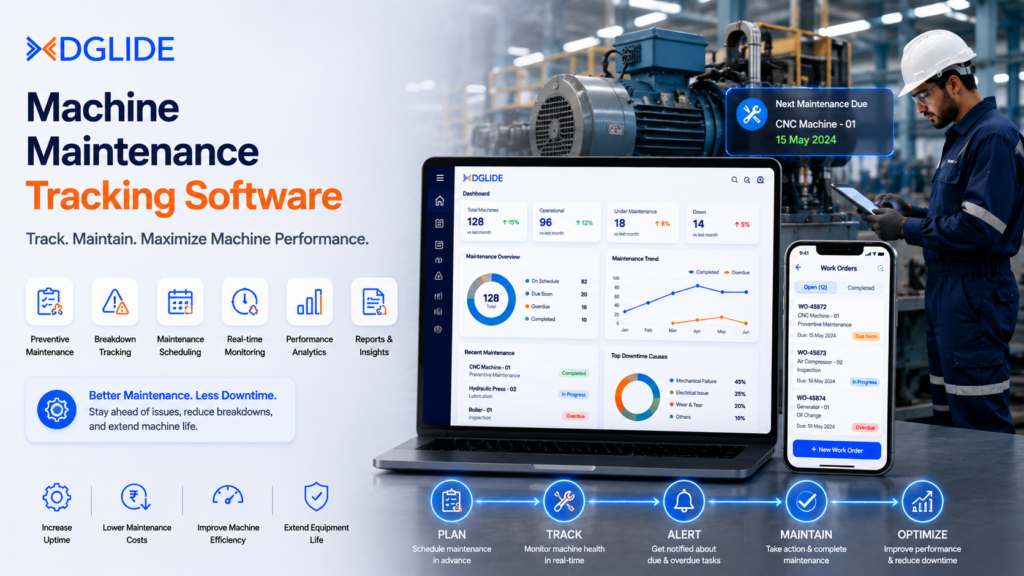
Unplanned equipment failure costs the world’s 500 largest manufacturers $1.4 trillion every year, roughly 11% of total annual revenue, per Siemens’ True Cost of Downtime 2024.
Machine maintenance tracking software – also called a CMMS (Computerized Maintenance Management System) – is the direct operational fix for that number. It centralizes work orders, asset histories, and spare-parts inventory so teams shift from reacting to failures to preventing them.
This guide covers what CMMS software does, how it compares to EAM, which features matter, how to choose the right tier, and which platforms lead the market in 2025.
What Is Machine Maintenance Tracking Software?
Machine maintenance tracking software is a digital platform that records, schedules, and monitors all maintenance activity across an organization’s physical assets. It replaces spreadsheets, paper logs, and reactive repair calls with one structured system.
| Also known as | CMMS — Computerized Maintenance Management System |
| Core function | Centralize work orders, PM schedules, asset histories, and parts inventory |
| Primary outcome | Shift from reactive ‘break-and-fix’ to proactive preventive maintenance |
| Who uses it | Manufacturing, facilities, healthcare, energy, government, logistics |
CMMS vs. EAM: Which One Does Your Operation Need?
Maintenance teams frequently confuse these two categories. Choosing the wrong one creates either operational gaps or budget waste.
| CMMS | EAM (Enterprise Asset Management) | |
| Focus | Maintenance execution | Full asset lifecycle management |
| Covers | Work orders, PM scheduling, parts inventory, technician management | All CMMS functions + procurement, depreciation, capital planning, disposal |
| Compliance | Basic audit trail and work history | Deep regulatory compliance modules |
| Multi-site | Available in mid/enterprise tiers | Built-in for enterprise deployments |
| Best for | Most manufacturing, facilities, field teams | Aviation, utilities, pharma, government |
| Pricing | $0–$150+/user/month | Custom enterprise pricing |
| 💡 Decision Guide |
| Choose CMMS if your primary need is managing work orders, PM schedules, and spare parts — this fits most manufacturing plants and facilities teams. |
| Choose EAM if you need to track assets from acquisition to disposal, including capital planning, depreciation, and regulatory audit trails. |
| Choose both if you run multiple facilities and need centralized financial governance alongside maintenance operations. |
5 Core Features That Separate Effective CMMS Platforms from Basic Tools
Not all maintenance tracking platforms deliver equal value. These five features determine whether a CMMS actively reduces downtime or simply digitizes the same manual process you already have.
| # | Feature | What It Does | Why It Matters |
| 1 | Work Order Management | Automates full cycle — request → assignment → completion → audit log | Eliminates lost requests; creates searchable repair history per asset |
| 2 | Preventive Maintenance (PM) Scheduling | Triggers tasks by calendar interval (every 30 days) or usage reading (every 500 hrs) | Single most direct lever for reducing unplanned failures |
| 3 | Asset History & Parts Inventory | Every repair, cost, and inspection logged to a specific asset; auto-reorder for parts | Eliminates stockout delays — a leading cause of extended downtime |
| 4 | Mobile Access | Technicians create, update, and close work orders from the equipment itself | Removes transcription delays; ensures records are accurate in real time |
| 5 | Analytics & KPI Dashboards | Surfaces MTTR, MTBF, OEE, and uptime/downtime trends | ABB (2024): 2/3 of plants face downtime monthly at $125K/hr — teams tracking MTTR are the ones reducing it |
The bottom line: a CMMS without analytics shows you what happened. A CMMS with full KPI dashboards tells you how to prevent it next time.
Top Machine Maintenance Tracking Software — 2025 Comparison
The table below covers the leading platforms across operational profiles, based on AIO search intent data, published capability reviews, and G2/Capterra ratings.
| Platform | Best For | Standout Feature | Pricing (from) | Ideal Team Size |
| MaintainX | Mobile-first & frontline teams | AI anomaly detection + QR code asset tagging | $16/user/mo | 5 – 500 |
| Limble CMMS | PM automation | Drag-and-drop PM calendar; inventory reorder alerts | $28/user/mo | 10 – 300 |
| UpKeep | Predictive maintenance & IoT | Real-time IoT sensor integration; condition-based WOs | $20/user/mo | 10 – 500 |
| eMaint (Fluke) | Mid-to-large manufacturers | Interactive facility maps; clickable asset hotspots | Custom | 50 – 5,000 |
| Fiix (Rockwell) | Industrial & ERP ecosystems | AI ‘Foresight’ failure prediction; deep ERP integration | Custom | 100 – 10,000 |
| IBM Maximo | Enterprise & regulated industries | Full EAM + AI predictive maintenance; compliance audit | Custom | 500+ |
| Coast | Small teams, fast setup | Setup in < 1 day; all-in messaging + work orders | $8/user/mo | 1 – 50 |
Sources: eMaint · IBM Maximo · Accruent Buyer’s Guide · G2 / Capterra 2025 ratings
The Maintenance Gap No Vendor Covers: Tribal Knowledge Loss
Every CMMS comparison covers work orders, PM scheduling, and dashboards. None of them address what happens when your best maintenance technician retires.
Institutional knowledge — how a specific pump sounds before it fails, which tolerance setting actually works versus what the manual says — lives entirely in the heads of experienced technicians. When they leave, it leaves with them.
The CMMS platforms that solve this are those with structured asset notes, repair narrative fields, and searchable failure history tied to individual machines. Choosing a CMMS that enforces structured failure data entry is not a UI preference — it is a long-term operational risk management decision.
How to Choose the Right Machine Maintenance Tracking Software
Follow these four steps in order. Skipping to demos before completing step 1 is the most common reason teams end up locked into the wrong platform.
| 1 | Audit your asset count and site complexity
Under 200 assets on one site → entry-level or SMB CMMS. 500+ assets across multiple sites → need hierarchical asset structures, multi-site toolkits, and centralized reporting. |
| 2 | Map your maintenance team structure
Primarily frontline technicians on the floor → prioritize mobile UX and offline capability. Centrally managed team with a dedicated planner → prioritize scheduling automation and reporting depth. |
| 3 | Confirm your integration requirements
Identify every system the CMMS must connect to: ERP (SAP, Oracle), MES, inventory, or finance. Platforms that don’t integrate create duplicate data entry that offsets the software’s operational savings. |
| 4 | Check your compliance and audit trail needs
Regulated industries (food & beverage, pharma, aviation, utilities) need automated compliance logging, calibration tracking, and exportable audit trails — confirm this before any demo. |
CMMS Pricing: What to Expect Across Market Tiers (2025)
Pricing varies by deployment model, feature depth, and user count. Budget for the total first-year cost — not just the subscription.
| Tier | Price Range | Best For | What’s Included | What’s Missing |
| Free / Entry-Level | $0 – $30/user/mo | Very small teams, single sites | Basic work orders, asset list, simple PM | Reporting, IoT, integrations, multi-site |
| SMB CMMS | $30 – $75/user/mo | Growing operations up to 5 sites | PM scheduling, mobile access, basic inventory | Advanced analytics, compliance modules |
| Mid-Market | $75 – $150/user/mo | Multi-site facilities, 50–500 assets | Analytics, integrations, multi-site, compliance | Full EAM, predictive AI |
| Enterprise | Custom pricing | Asset-intensive, regulated industries | Full EAM, AI predictive, ERP integration, audit trails | — |
| Hidden costs to factor in: implementation time, data migration from legacy systems, and staff training can represent up to 15% of total first-year spend — independent of the subscription fee. |
Frequently Asked Questions
Machine maintenance tracking software is a CMMS that digitally manages work orders, PM schedules, asset histories, and parts inventory in a single platform. It enables operations teams to shift from reactive to preventive and predictive maintenance.
A CMMS focuses on maintenance operations — scheduling, work orders, and parts. An EAM covers the full asset lifecycle including procurement, depreciation, capital planning, and disposal. Most manufacturing teams start with CMMS; regulated enterprises with complex financial requirements use EAM or a combined platform.
CMMS pricing ranges from free entry-level tools to custom enterprise pricing above $150/user/month. SMB platforms typically cost $30–$75/user/month. Factor in implementation, data migration, and training for a realistic total first-year budget.
Coast is the leading entry-level option at $8/user/month with same-day setup. MaintainX is a strong alternative for small teams that need a mobile-first interface and AI-powered work order management without enterprise complexity.
Yes. Platforms like UpKeep and eMaint natively integrate with IoT sensors monitoring vibration, temperature, and current in real time. When readings cross defined thresholds, the system automatically generates a work order — enabling condition-based maintenance without manual inspection cycles.
CMMS reduces downtime through three mechanisms: automated PM scheduling prevents failures before they occur; parts inventory management eliminates stockout delays; and KPI dashboards surface repeat failure patterns so root causes get fixed. Siemens’ 2024 downtime report found unscheduled downtime costs up to 11% of annual revenue — CMMS adoption is the most direct operational lever to reduce that exposure.
Cloud-based CMMS offers faster deployment, lower upfront cost, mobile access, and automatic updates — right for most SMB and mid-market operations. On-premises gives regulated industries full data control and deeper custom configuration, but requires dedicated IT infrastructure and higher implementation investment.
