

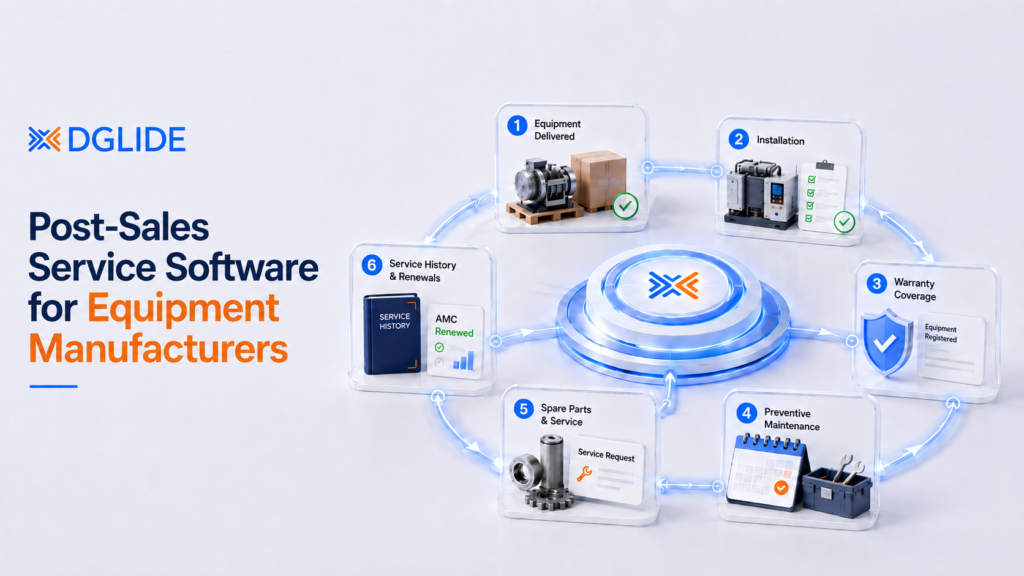
Post-sales service software for equipment manufacturers connects installed equipment, warranty records, AMC contracts, technician dispatch, spare parts, and service tickets into one operating system.
For OEMs selling machines, devices, components, or industrial equipment, the sale is not the end of the customer relationship. The real margin often begins after installation, when service calls, warranty claims, preventive maintenance, and spare parts decide retention.
A BCG study found that equipment manufacturers with direct customer relationships generate around 33% service revenue, compared with 17% for component and subsystem makers. That makes post-sales service a revenue function, not a support queue.
DGlide fits this shift because its Field Service Management platform connects task scheduling, resource planning, technician tracking, and service analytics for teams moving beyond Excel, WhatsApp, and disconnected service desks.

Service revenue is materially higher when equipment manufacturers control the customer relationship after the original sale.
TL;DR
- Post-sales service software connects equipment, warranty, AMC, dispatch, spares, and service tickets.
- DGlide suits OEMs that want flexible service workflows without heavy ERP dependency.
- The right tool should reduce repeat visits, missed warranty checks, and manual technician coordination.
- Choose software based on workflow fit, not only feature count.
What Should Post-Sales Service Software Actually Do?
Post-sales service software for equipment manufacturers should manage every service event after a product is installed. It should show who owns the machine, where it is located, what warranty applies, which technician visited, and what revenue action follows.
A Service Head should not need five tools to answer one customer complaint. The software should connect the equipment record, ticket, technician, spare part, and AMC status in the same workflow.
| Service Area | What Must Be Visible | Business Impact |
| Installed base | Serial number, model, site, owner | Stops repeat discovery on every service call |
| Warranty and AMC | Coverage, expiry, contract rules | Prevents claim leakage and missed renewals |
| Dispatch | Technician skill, route, SLA | Reduces delayed visits and manual allocation |
| Spare parts | Stock, reserved parts, used parts | Improves first visit closure |
| Service history | Faults, notes, photos, approvals | Creates machine-level memory for future calls |
The practical test is simple. If a customer calls with a breakdown, the service team should assign the right technician without rebuilding the machine history from phone calls.
Why Do OEMs Outgrow ERP, Excel, and WhatsApp After the Sale?
OEMs outgrow ERP, Excel, and WhatsApp when service work becomes too dynamic for static records. ERP stores the commercial record, but post-sales service needs live assignment, warranty logic, technician updates, and customer-level service history.
This is where many equipment manufacturers lose control. Sales data sits in ERP, service tickets sit in email, dispatch runs on calls, and spare parts availability sits with one inventory manager.
| Peter Drucker’s often-cited line, “What gets measured gets managed,” fits OEM service revenue. Deloitte notes that manufacturers focused on services often have 80%+ of their installed base under service contracts, and aftermarket parts and services can deliver over 50% of manufacturer profit. Source: Deloitte |
For a 300-person OEM with 40 field technicians, informal service records become expensive. The system needs to behave like a revenue control layer, not a shared folder with polite intentions.
Best Post-Sales Service Software for Equipment Manufacturers in 2026
The best post-sales service software depends on equipment value, service complexity, dealer structure, and workflow control. The list below is alphabetical so buyers can scan options without ranking bias.
The AIO result shows that users are looking for installed base tracking, warranty management, field dispatch, spare parts inventory, and service history. That means a pure scheduling tool is not enough for most OEM service teams.
| Software | Best Fit | Check Before Choosing |
| Aftersale CRM | Heavy machinery service teams | Mobile depth, AMC logic, and integrations |
| DGlide | Mid-market OEMs needing FSM, CRM, ticketing, and configurable workflows | Strong fit when service processes change often |
| DigifySoft | India-focused service CRM users | Customization limits and reporting depth |
| Flowlens | SME equipment manufacturers needing ERP-linked workflows | Workflow change control without vendor dependency |
| Lighthouse ERP | Equipment sales and service teams needing ERP depth | Field dispatch flexibility |
| Makula | OEMs needing installed base and service history depth | Pricing, region fit, and rollout model |
| Microsoft Dynamics 365 Field Service | Enterprises already using Microsoft stack | License complexity and consulting dependency |
| Salesforce Field Service | Large Salesforce-led manufacturers | Cost and field service setup effort |
| ServiceCPQ | OEMs with complex service contracts | Fit beyond CPQ and contract workflows |
| ServiceMax | Large industrial service organizations | Implementation cost and admin dependency |
DGlide sits in the practical middle of this shortlist. It is broader than a dispatch tool and lighter than a full enterprise implementation that makes every workflow change feel like a committee meeting.
What Does a Strong OEM Service Workflow Look Like?
A strong OEM service workflow moves from customer request to ticket creation, warranty check, spare part validation, technician dispatch, closure, and revenue action. Each step should stay visible to the Service Head, dispatcher, technician, and customer-facing team.
This is where DGlide becomes useful without needing to sound promotional. Its FSM, CRM, ticketing, and ITSM modules can connect the post-sales chain that otherwise breaks across tools.

Chart 2: A practical post-sales service workflow connects field work with warranty, spares, and revenue actions.
DGlide’s Ticket Management system supports workflow automation, centralized ticket management, SLA management, automated routing, and customer issue tracking. Its CRM module helps keep customer records connected with support and service history.
Where Do Post-Sales Service Software Projects Fail?
Post-sales service software projects fail when the platform copies old processes instead of fixing the service control problem. If Excel logic moves into a new dashboard without ownership, routing, warranty rules, and closure evidence, the same issues return with a nicer login screen.
This is the burned-buyer problem. Many OEM teams have tried ERP modules, CRM add-ons, or generic FSM tools and still run dispatch on WhatsApp because the system did not match daily service work.
| Failure Mode | What Happens | What Better Looks Like |
| ERP-only service setup | Records exist, but field work stays manual | Tickets, technicians, and asset history stay linked |
| Generic FSM setup | Dispatch works, but warranty logic stays outside | Job assignment connects with contract data |
| CRM-only setup | Complaints are tracked, but machine history is weak | Customer, asset, and service records stay together |
| WhatsApp dispatch | Fast for one technician, chaotic for forty | Owned tickets carry timestamps and SLA trails |
The fix is not more software. It is a workflow layer that lets service leaders change rules as products, territories, warranty terms, and customer expectations change.
Why Should You Choose DGlide?
DGlide is a strong fit for equipment manufacturers that need post-sales service software across FSM, CRM, ticketing, and ITSM workflows. It works well when the current setup is split across ERP, Excel, WhatsApp, email, and separate customer support tools.
In DGlide deployments for manufacturing and airport operations teams, the strongest fit appears when non-technical operations users need to adjust workflows themselves. That is where no-code configuration matters more than a large implementation plan.
- Installed equipment workflows: service tickets can connect to customer, asset, location, and technician context.
- Warranty and AMC logic: business teams can configure rules without waiting for custom code.
- Field technician dispatch: jobs can move from ticket to field action through DGlide FSM.
- Service ticket accountability: SLA timers, ticket ownership, and closure notes stay visible.
- Customer continuity: sales, service, and support data can stay connected through DGlide CRM.
Compared with heavy enterprise systems, DGlide is better suited for mid-market OEMs that cannot wait months for workflow changes. Compared with WhatsApp and Excel, it gives service leaders owned tickets, machine-linked records, and searchable closure trails.
If your service team already knows the process but lacks one system to control it, book a free 15-minute DGlide demo. You leave with a gap view, whether or not you proceed.
Conclusion
Post-sales service software for equipment manufacturers is now a revenue control decision. The right platform connects installed base, warranty, AMC, dispatch, spare parts, tickets, and service history so OEMs can protect margin after equipment sale.
For a VP Operations, COO, or Service Head, the next step is to audit where service data breaks today. Once that gap is clear, the shortlist becomes easier because the winner is the platform that fits the service workflow.
FAQs
What is post-sales service software for equipment manufacturers?
Post-sales service software for equipment manufacturers manages service after equipment sale. It tracks installed assets, warranty, AMC, tickets, dispatch, and spares. It helps OEMs control service revenue and customer retention.
Which features matter most in post-sales service software?
The most important features are installed base tracking, warranty management, dispatch, AMC, and spare parts visibility. Service ticketing and SLA tracking are also essential. OEMs should prioritize workflow control over long feature lists.
Is DGlide suitable for equipment manufacturers?
DGlide is suitable for mid-market equipment manufacturers needing configurable service workflows. It connects FSM, CRM, ticketing, and ITSM use cases. It fits teams moving away from Excel, WhatsApp, and rigid ERP workflows.
How should OEMs choose post-sales service software?
OEMs should choose post-sales service software by mapping their service workflow first. They should check warranty rules, technician dispatch, spare parts, AMC, and reporting needs. The right platform must change as service operations change.
Prepared for DGlide | Short draft with charts, internal links, and verified sources
