

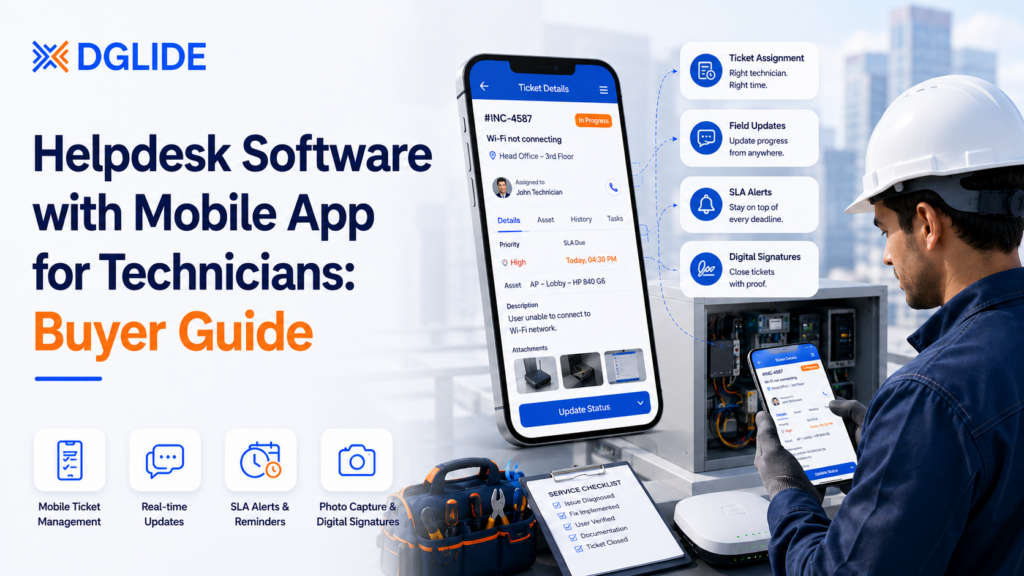
“A helpdesk that works only at the service desk has already failed half the team.”
Helpdesk software with mobile app for technicians is becoming a critical operations decision. According to MarketsandMarkets, the global field service management market is projected to reach USD 9.17 billion by 2030, up from USD 5.10 billion in 2025, as enterprises scale mobile workforces and demand real-time field visibility. That growth is not driven by back-office dashboards.
A good mobile helpdesk app does not just show tickets on a phone. Aquant’s 2025 Field Service Benchmark Report found that a failed first visit adds two additional visits on average, extending resolution timelines by 14 days.
That delay often comes from one gap: incomplete context at the point of service. A properly built mobile app gives technicians what they need to understand the issue, communicate clearly, and finish the job without calling the office every time.
TL;DR
- Mobile helpdesk apps should support field updates, not only ticket viewing.
- Technician experience matters because helpdesk work depends on communication and problem-solving.
- Mobile apps become necessary when ticket updates wait until technicians return to the office.
- Simple mobile workflows help new technicians follow the right steps without constant supervision.
- The best tools connect ticket details, asset history, SLA alerts, photos, and closure status.
- DGlide connects helpdesk, field service management, ITSM, and technician workflows in one platform.
What Is Helpdesk Software with Mobile App for Technicians?
Helpdesk software with mobile app for technicians is a ticketing platform that lets field or desktop support staff manage work from a phone or tablet. It connects ticket assignment, issue notes, asset history, SLA status, photos, and closure updates inside one technician view.
This is different from a normal helpdesk inbox. A mobile technician app has to work where the issue happens, not only where the support team sits.
How mobile helpdesk apps work for technicians
A ticket is created from email, phone, portal, chat, or internal request. The system assigns the issue to a technician based on category, priority, location, or skill.
The technician sees the ticket on mobile with user details, issue notes, location, asset records, and next steps. Teams that manage ITSM alongside field service operations need this flow to work without manual handoffs between the service desk and the technician. After the visit, the technician updates status, adds notes, attaches photos, and closes the task.
What technicians need to see on-site
Technicians need enough detail to solve the issue without asking the office for basic context. This includes the asset involved, past repairs, user notes, location, SLA target, and closure checklist.
For desktop support, this may be a laptop, printer, Wi-Fi device, or access issue. For field service, it may be a customer device, branch equipment, or operational asset.
Why Technician Experience Matters More Than Just Ticket Management
Helpdesk software with mobile app for technicians should improve the technician’s working day, not only the manager’s dashboard. A ticket may look organized in the system, but the user still feels ignored if the technician has no context or cannot update the job quickly.
Several operations leaders note that helpdesk hiring values customer service experience because the job involves talking to stressed users, explaining problems, and staying calm.
Helpdesk is technical support plus customer service
A technician may fix a device in ten minutes. But if the user gets no update, the support experience still feels poor.
That is why mobile helpdesk software must support clear communication. The technician should be able to update job status, add notes, and send closure details without waiting to return to a desk. Teams managing ticket workflows across multiple locations consistently report that mobile update speed is the single most important adoption factor.
Frustrated users need clear technician updates
Users raise tickets because something is blocking their work. They do not want to chase the technician, manager, or support desk for the next update.
A mobile app reduces this gap. It lets technicians update progress from the site while the service desk and manager see the same ticket state.
Beginner technicians need guided steps
The learning curve for new helpdesk roles is steep. New technicians often build skills in networking, Active Directory, Microsoft 365, printer issues, Wi-Fi problems, and user support.
A good mobile app should guide this learning. Checklists, knowledge base articles, and issue history help technicians follow the right path without guessing.
When Does a Business Need a Mobile Helpdesk App for Technicians?
A business needs helpdesk software with mobile app for technicians when tickets start moving outside the support desk. This happens when technicians visit branches, customer sites, factory floors, offices, warehouses, or service locations.
Email and basic ticketing may work when every issue is remote. They break when the job requires physical inspection, replacement, repair, or user handholding.
Warning signs to watch
The need usually appears through small daily delays. Managers should check these signs before buying another helpdesk tool.
- Ticket updates happen late. Technicians finish work first and update the ticket much later.
- Managers keep calling for status. The dashboard does not show the real field state.
- Technicians ask for asset history. They reach the site without knowing previous issues.
- Users repeat the same details. The technician does not see the original notes clearly.
- Photos and signatures are stored outside the ticket. Proof of work sits in gallery apps or email rather than the ticket record.
- New technicians need constant guidance. The workflow is not clear enough for junior staff.
These signs mean the ticketing system is not giving technicians the context they need. Operations teams evaluating ITSM software for India-based and Middle East field operations often trace these gaps back to the informal tools they were relying on before a proper platform was deployed.
The Hidden Problem: Technicians Can Learn Tools, But Poor Workflows Slow Everyone Down
Helpdesk software with mobile app for technicians fails when the workflow is harder than the job. Ticketing tools can be learned quickly, but customer handling and clear process habits matter more than any feature list.
That is the hidden problem. A tool can have many features and still slow the technician if every update needs too many fields.
“Complex equipment, leaner teams, and higher customer expectations are making field service harder to manage with manual troubleshooting alone.” Laryssa Alexander, Industry President, Field Service, ECI Software Solutions Source: ECI Software Solutions, May 2026
Why too many ticket fields reduce adoption
Technicians avoid tools that feel like admin work. If updating a ticket takes longer than explaining the fix to the user, the app will lose adoption.
This is common in field and desktop support teams. The system asks for every possible detail, but the technician only needs a clear path to close the job correctly.
Why mobile workflows should be simple
A good mobile workflow should answer four questions quickly. What is the issue, where is it, what asset is involved, and what must be done next?
The app should then let the technician update status, add notes, attach proof, and close the job. Anything beyond that should earn its place.
📊 Bottom-performing field service organizations report avoidable dispatch rates of 24%: Poor ticket context and missing asset history send technicians to jobs they cannot resolve on the first visit. Source: Aquant Field Service Benchmark Report, 2025
How better workflows reduce repeat calls
Repeat calls often happen because the first visit had poor context or incomplete closure notes. The technician fixed the symptom, but the team did not learn enough from the ticket.
A better workflow records the issue, asset, fix, proof, and next action. Teams choosing between a Freshdesk alternative for operations and field teams and a field-first platform often cite this visibility gap as the deciding factor.
Must-Have Features in Helpdesk Software with Mobile App for Technicians
Helpdesk software with mobile app for technicians should cover the full field support loop. It should help teams assign, update, resolve, and review tickets without leaving key details outside the system.
A buyer should not judge only by the desktop dashboard. The mobile screen is where the technician will either adopt the tool or avoid it.
Core feature checklist
Use this checklist before shortlisting any mobile helpdesk platform.
| Feature | Why technicians need it | What to check |
| Mobile ticket assignment | Technicians need jobs without calling the office | Can tickets be assigned by skill, location, or priority? |
| Status updates | Managers need live progress | Can technicians update status in seconds? |
| Asset history | Field staff need past issue context | Can the app show past repairs and ownership? |
| Photos and signatures | Proof of work needs to stay with the ticket | Can the technician attach files from mobile? |
| Knowledge base | Junior technicians need guided fixes | Can articles open from the ticket? |
| SLA alerts | Urgent tickets need early attention | Can the app show due time and escalation status? |
| Offline or low-network support | Sites may have weak connectivity | Can updates save when the network drops? |
| Manager view | Supervisors need field visibility | Can managers see technician status and backlog? |
This checklist keeps the buying team focused on technician work. A helpdesk tool that looks good for admins may still fail on-site.
🔧 Teams managing tickets across branches and field locations need a platform that connects service desk intake with technician mobility. Checklists and asset records should load from the first tap, not after a supervisor calls in. Book a 15-minute DGlide session to see how your ticket types map to real technician field workflows.
Helpdesk Software with Mobile App for Technicians Compared
Helpdesk software with mobile app for technicians should be compared by mobile depth, technician fit, asset context, setup effort, and where the tool may fall short. A long feature list does not prove the field team will use it.
The table below keeps the comparison focused on practical fit. Use it as a shortlist guide before demos.
| Tool | Best-fit team | Mobile app strength | Technician workflow fit | Asset support | Setup effort | Where it may fall short |
| DGlide | Mid-market teams with field technicians | Strong mobile field workflows | Ticket-to-technician flow, Field Service Management, ITSM, assets | Strong | Low to medium | Not built for huge global governance |
| Freshservice | IT support and service desk teams | Good mobile IT support | Strong for IT tickets and service desk | Good | Low to medium | Field service depth may need extra setup |
| HelpDesk | Customer support teams | Basic to moderate | Strong for message-led support | Limited | Low | Less suited for asset-heavy technician work |
| HelpSpot | Email-heavy support teams | Basic | Good for shared inbox style support | Limited | Low | Not built around technician dispatch |
| Jira Service Management | IT and engineering teams | Good for IT teams | Strong for issue and request workflows | Good | Medium | Non-technical users may find it heavy |
| ManageEngine ServiceDesk Plus | IT-heavy SMBs | Good for IT technicians | Strong helpdesk and asset workflows | Strong | Medium | Field technician workflows may need added setup |
| Salesforce Field Service | Salesforce-led service teams | Strong field mobile app | Strong dispatch and field service workflows | Strong | Medium to high | Needs Salesforce admin maturity |
| ServiceNow Field Service | Large enterprises | Strong enterprise mobility | Strong enterprise field operations | Strong | High | Often too heavy for lean teams |
| Zendesk | Customer support teams | Good support app | Strong customer service ticketing | Limited | Low to medium | Not deep enough for IT asset field work |
Teams comparing ServiceNow alternatives for mid-market operations often find that enterprise tools add governance overhead without improving the technician experience at the site level.
This comparison shows the real decision. The best mobile app is not always the one with the most functions. It is the one that helps technicians close work with less back-and-forth.
How to Choose a Mobile Helpdesk App Your Technicians Will Actually Use
A buyer should choose helpdesk software with mobile app for technicians by watching how technicians work in the field. Start with daily tasks, not the vendor demo.
The best selection process is simple. Give the app to a technician, assign a real ticket, and check whether they can move from assignment to closure without calling the office.
The technician adoption test
Use this test during product evaluation.
- Can the technician find the assigned job in under one minute?
- Can they see user details, asset history, and issue notes together?
- Can they update status without filling unnecessary fields?
- Can they add photos, notes, and signatures from mobile?
- Can they access knowledge base content from the ticket?
- Can the manager see the update immediately?
- Can a junior technician follow the workflow without extra training?
This test is more useful than a feature checklist alone. It shows whether the tool fits actual field behavior.
What to avoid
Avoid tools that make technicians work around the app. That usually means long forms, unclear statuses, slow mobile screens, and missing asset history.
Also avoid tools that only look strong for support managers. The technician view matters because that is where the ticket gets updated, delayed, or ignored.
📱 Teams running this evaluation often discover their current helpdesk was never designed for technicians working away from a desk. A mobile-first platform should pass the adoption test before purchase, not after. Book a free 15-minute session to run your ticket types through a DGlide technician field workflow.
Why DGlide Fits Teams That Need Helpdesk and Technician Mobility Together
DGlide fits teams that need helpdesk software with mobile app for technicians across IT, operations, and field service. It connects ticket management, Field Service Management (FSM), IT Service Management (ITSM), asset context, SLA tracking, and no-code workflow control.
DGlide is strongest when a ticket does not stay inside the helpdesk. A branch device issue, factory floor fault, facility repair, or field service request can move from ticket intake to technician action.
DGlide’s practitioner POV
In operations-heavy teams, support does not follow neat departments. IT owns the request, operations feels the delay, and technicians close the work.
DGlide’s fit is in making that handoff visible. The team can capture the ticket, assign the technician, track SLA status, record field updates, and close the task without moving details across informal tools, email, and spreadsheets.
“Live chat, self-service portals, and knowledge management systems are solidifying their place as essential tools for fast, scalable support.” J.J. Moncus, Principal, Research, Gartner Customer Service & Support Practice Source: Gartner, August 2025
What DGlide handles well
DGlide works well for teams that need practical technician workflows. This includes manufacturing, facility management, logistics, FMCG, and equipment service teams.
Key fit areas include:
- Ticket-to-technician workflows: Requests can move from helpdesk to field action without manual re-entry.
- Mobile field updates: Technicians can update task progress from the site as the work happens.
- Asset-linked records: Tickets can carry device or equipment context into the field.
- No-code workflow changes: Teams can adjust forms and routing without developer queues.
- Field Service Management and ITSM connection: Service desk and field service work closer together in one platform.
Teams evaluating field service management software for operations find that DGlide’s no-code configuration reduces setup time compared to enterprise-tier alternatives.
📊 The global field service management market is projected to reach USD 9.87 billion by 2031: Growing at 9.54% CAGR, this expansion reflects rising enterprise demand for mobile-first, technician-ready service platforms. Source: Mordor Intelligence, February 2026
DGlide vs traditional helpdesk tools
Traditional helpdesk tools are often built around the support queue. That works when most tickets are solved from a desk.
DGlide is a better fit when tickets become physical tasks. It helps teams connect ticket intake, technician mobility, field updates, and operational visibility in one flow. Businesses comparing Zoho FSM alternatives for field service teams in India or the Middle East often find DGlide a closer fit for lean operations without enterprise overhead.
DGlide is not the right fit for every enterprise. A global service organization with complex governance, thousands of technicians, and deep enterprise architecture may need ServiceNow or Salesforce Field Service.
🛠️ Operations teams need a helpdesk that closes tickets in the field, not just tracks them on a dashboard. DGlide connects ticket intake, technician mobility, asset records, and SLA tracking in one no-code platform.
Conclusion
Helpdesk software with mobile app for technicians should help field and desktop support teams understand, update, and close work from the site. The manager dashboard matters less than what the technician sees on their phone when they arrive at the job.
The best tool is the one technicians can use during the job. If it reduces calls to the office, carries asset history, and gives managers live status without extra admin steps, it will return far more value than a helpdesk built only for desktop queues.
FAQs About Helpdesk Software with Mobile App for Technicians
A standard helpdesk tool manages tickets from a desktop queue. A mobile helpdesk app gives technicians access to ticket details, asset history, and closure steps from the field. The key difference is where work gets done: at a desk or at the site.
Adoption fails when the app adds more admin work than it removes. Technicians stop using tools that require too many fields to close a simple job. The workflow must answer three questions fast: what is the issue, where is it, and what must be done next.
Technicians need mobile access because many issues happen away from the service desk. Mobile access lets them view job details, add notes, attach photos, and update status. It reduces calls between field staff and office teams.
The best fit depends on team size, industry, and workflow type. Freshservice suits IT-heavy support teams, while Salesforce Field Service fits enterprise operations with existing Salesforce infrastructure. DGlide fits mid-market operations teams needing ticketing, mobile field updates, and asset records together.
